

Zenmate VPN – 6 Month
Shared ID
5 Device
Full Warranty
ZenMate VPN is a hit-and-miss VPN service that will suit the needs of the average user. It unblocks some streaming platforms like Netflix, supports torrenting, and has a cheap long-term plan. However, its selection of tunneling protocols is limited, the speeds aren’t impressive, and it is based in a Five-Eyes country.
In this ZenMate review, I’ll throw some light on the service explaining its every aspect in greater detail. Streaming performance, features, security, apps, and customer support – all will be covered. Let’s find out whether ZenMate delivers on its promises.
Is ZenMate good for torrenting & P2P?
Due to local regulations, torrenting is restricted on specific servers, but it does work. If you’re looking for a VPN for torrenting, ZenMate should do the trick.

The connection speeds had a good start but then started stalling at ~4MB/s (32mbps). Due to the nature of P2P, this may have little to do with ZenMate.
ZenMate VPN features
Smart Locations
Smart Locations work like automated split tunneling. The feature automatically turns on VPN for select websites. That way, if you know that you’ll be using Netflix only when connected through a VPN, you can enable smart locations. This saves a lot of time when you have to switch servers for particular uses. Sadly, it’s only available on their browser add-on.

On the downside, this is also something that could introduce DNS leaks. This is because of DNS Prefetching which is used to save time by caching frequently visited IP addresses. When Smart Locations is enabled, this could reveal your pre-cached DNS. Thus, the possible solutions include disabling DNS pre-caching or just sticking to the Zenmate desktop app.
Favorites
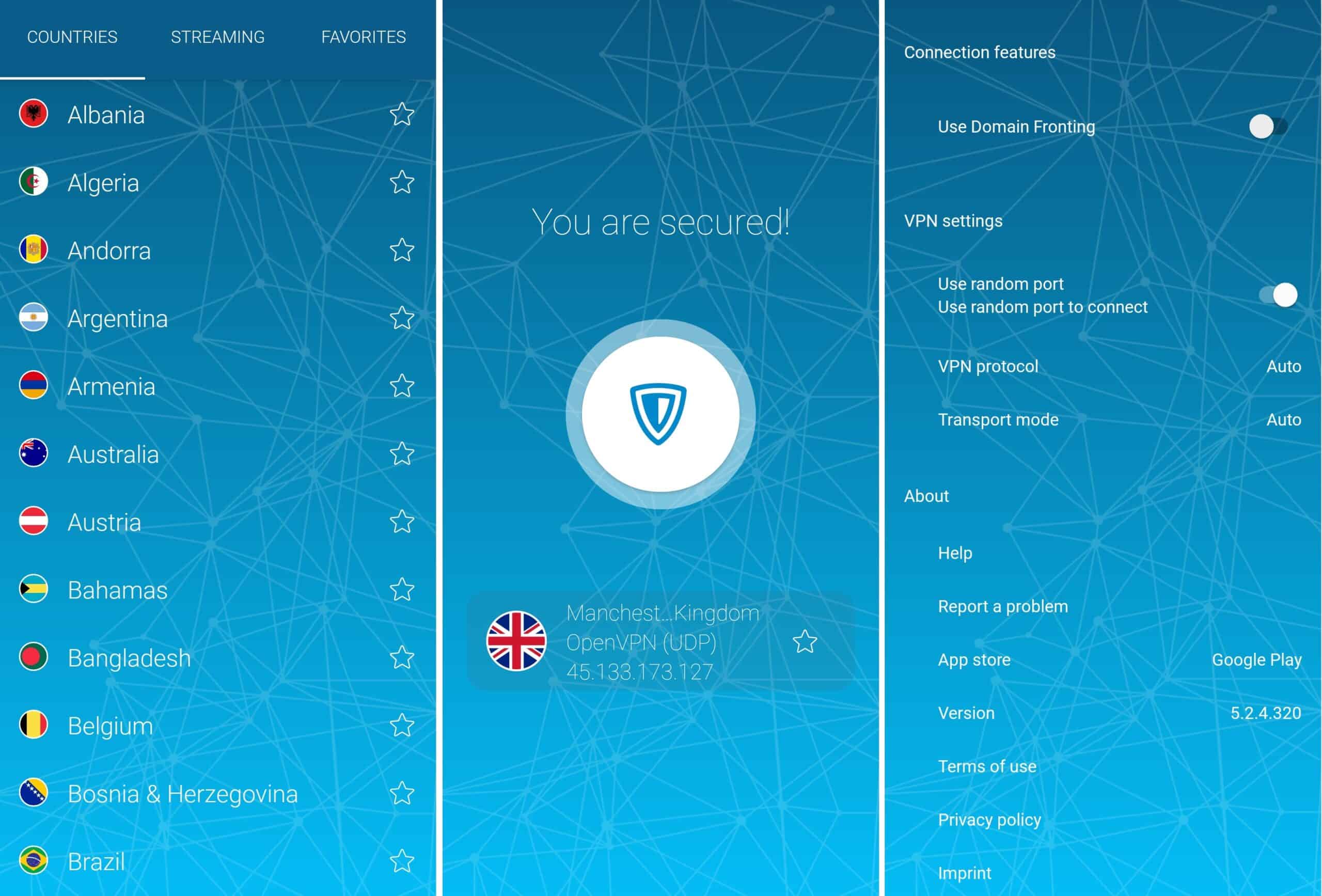
If you find yourself returning to the same server often, there is a favorites section. You can just click the star icon on the right side, and it will add the server to your Favorites tab. From there, it will be easy to find it for later use.

This is the most useful with streaming servers as it may sometimes take a while to find the right one for a service that you want to unblock. You can even add several of them for backup when the other ones are full.
Is ZenMate VPN safe?
ZenMate is a safe VPN from a technical standpoint. Where it fails to meet our expectations are the privacy policy and location. If you’re looking for a secure VPN service, those can be a dealbreaker. Five Eyes country and the no-logs policy that notes the possibility that it could be overturned.
Encryption
Your connection is made private with the help of the AES-256-CBC cipher. This method uses private keys for traffic encryption and decryption. Meaning that you could send and receive the data, but it would remain incomprehensible to outsiders as they don’t have private keys. Also, when you’re connecting a server, authentication is processed with the help of the SHA-256 hash function.
This isn’t too different from other VPN services in the market. I detected that ZenMate connects to some of the same servers as CyberGhost, using identical ports and configurations. This may sound weird, but in fact both are owned by Kape Technologies. It would seem that under the hood, the services are more similar than they may appear.
Tunneling protocols
Tunneling protocols coordinate how your data will be sent via the VPN. Will it be faster but less secure, or will it be very safe but slower – it is up to you. Changing the tunneling protocol should be a conscious decision depending on your use case. With ZenMate, you get to choose from:
IKEv2 – one of the most common tunneling protocols. It works on a long list of devices out of the box and is pretty lightweight. Available on Windows and macOS apps.
OpenVPN (TCP/UDP) – an open-source protocol that is quite customizable. You can use UDP skipping additional data verification checks for speeds or TCP for slower speeds but stronger data integrity. Available for Windows, Android, and iOS apps.
Sadly, those two are all the options you get. There’s no WireGuard, and no Shadowsocks or obfuscation. You’re getting a pretty limited setup, which can be a security flaw in itself.
Kill switch
A kill switch is an additional safeguard when the link between your device and VPN server gets interrupted. We put them to the test to see how they would fare in real-life situations. The first test involves blocking IP addresses via a router to stop the connection. The second is killing the VPN processes from the device and checking how the app responds.
In the first test, the kill switch triggered as it should. It disabled my Internet connection and started to reconnect in the background. The only issue was that it didn’t give any notification about the killswitch being engaged.
When disabling OpenVPN processes, the app noticed these changes and created additional ones to reconnect. Though, when I killed the whole background process, ZenMate still indicated that I was connected despite losing access to the Internet. Only a computer restart resolved this.
So, you can be confident that ZenMate will have your back even in cases when the connection drops.
Logging
ZenMate is based in Germany, which isn’t perfect. The country is part of the 14 Eyes surveillance alliance and is a member of the European Union. All of this is can be problematic if you’re looking for privacy and anonymity.
The service itself promises no logs but the privacy policy seems to contradict itself. They state that: “The data controller shall process and store the personal data of the data subject only for the period necessary to achieve the purpose of storage, or as far as the European legislator grants this”. So, their no logs policy could quickly be turned around if the EU/Germany’s stance on data retention changes.
They also admit to collecting quite a lot of data from website visits and even using tracking pixels in newsletters. This isn’t something that you’d want to find in your VPN’s terms of service from a privacy standpoint.


Reviews
There are no reviews yet.